
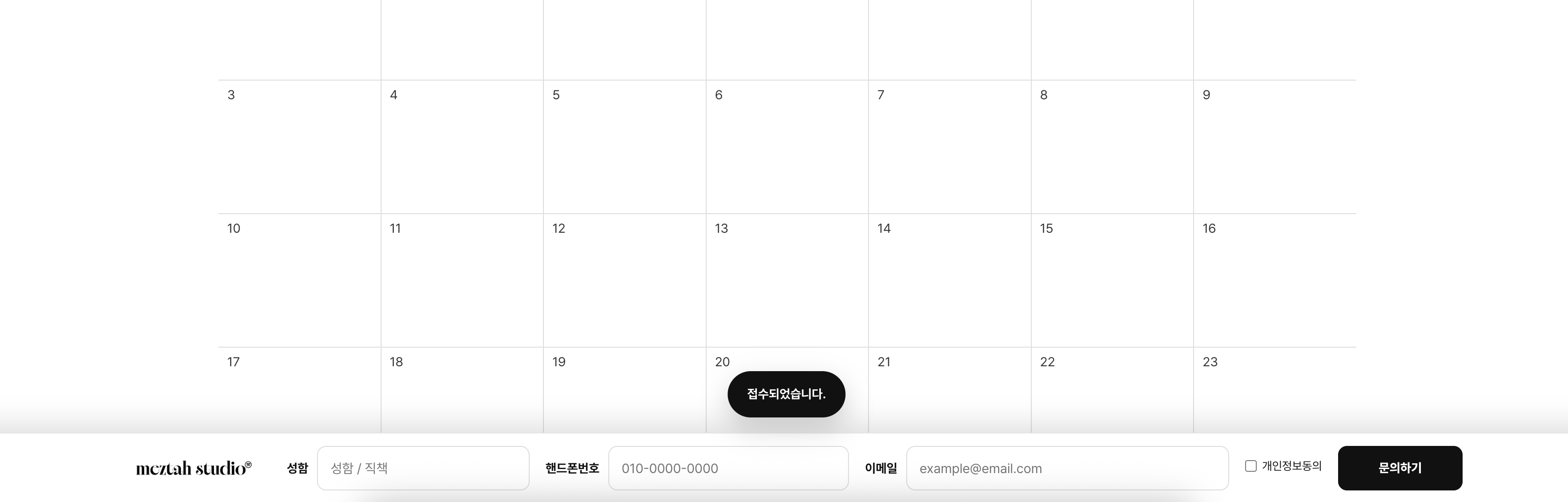
홈페이지 방문자는 생각보다 문의 버튼을 끝까지 찾아가지 않습니다.
특히 모바일 사용자가 많은 홈페이지의 경우, 문의하기 버튼이 항상 보이는 것만으로도 문의 전환율이 크게 달라질 수 있습니다.
이번에는 아임웹 기본 입력폼은 그대로 사용하면서, 화면 하단에 항상 노출되는 고정 문의바를 만드는 방법을 소개합니다.
실제 문의 데이터는 아임웹 입력폼으로 정상 저장되기 때문에 관리도 편하고, 사용자 입장에서는 훨씬 빠르게 문의를 남길 수 있습니다.
구현 예시
믓아 스튜디오
믓아 스튜디오는 브랜드의 본질을 시각적으로 재해석해, 감각적이고 구조적인 웹 경험을 만듭니다. 브랜딩 웹사이트, 클리닉·법률·기업 사이트, 크리에이티브 페이지 제작 전문.
meztahstudio.imweb.me
이 코드로 구현되는 기능
이 커스텀 코드를 적용하면 아래 기능이 구현됩니다.
- 화면 하단에 고정 문의바 생성
- 이름, 연락처, 이메일 입력 가능
- 개인정보 동의 체크
- 문의 접수 버튼 제공
- 아임웹 기본 입력폼과 자동 연동
- 휴대폰 번호 자동 하이픈 적용
- 문의 완료 시 토스트 메시지 출력
- PC / 태블릿 / 모바일 반응형 지원
- 기존 입력폼은 숨기고 데이터만 활용
즉,
사용자는 하단 고정바만 보게 되고,
실제 데이터는 아임웹 입력폼으로 저장되는 구조입니다.
06. 아임웹 HTML 위젯 사용법|초보자도 가능한 커스텀 코드 적용 방법
아임웹으로 홈페이지를 만들다 보면 기본 기능만으로는 원하는 디자인이나 기능을 구현하기 어려울 때가 있습니다.예를 들어,버튼을 더 예쁘게 만들고 싶을 때후기 슬라이드를 넣고 싶을 때문
meztahstudio.tistory.com
사용하면 좋은 상황
다음과 같은 홈페이지 제작 시 특히 효과적입니다.
- 병원 홈페이지
- 진료 예약 문의 유도
- 기업 홈페이지
- 견적 문의 확보
- 법률사무소
- 상담 신청 유도
- 건축·인테리어
- 프로젝트 문의 확보
- B2B 홈페이지
- 영업 리드 수집
- 랜딩페이지
- 광고 전환 극대화
특히 스크롤이 긴 랜딩페이지에서 매우 효과적입니다.
적용 방법
STEP 1
아임웹에서 입력폼을 먼저 생성합니다.
STEP 2
개발자도구(F12)를 열어 입력폼 내부 ID를 확인합니다.
STEP 3
본문 하단 HTML 위젯에 코드를 삽입합니다.
STEP 4
스크립트 내부 입력폼 ID를 자신의 사이트에 맞게 수정합니다.
const widgetId = "w202605292bb30d42663ae";
STEP 5
게시 후 정상 작동 여부를 테스트합니다.
개발자코드에서 확인해야 할 것
이 코드는 특정 입력폼과 연결되는 방식입니다.
따라서 아래 값들은 반드시 본인 사이트 기준으로 확인해야 합니다.
입력폼 위젯 ID
const widgetId = "w202605292bb30d42663ae";
이름 필드
#input_txt_475df3e9949c8
이메일 필드
#input_email_c8b9147bada7f
전화번호 필드
phonenumber1_d775d74ba2304
phonenumber2_d775d74ba2304
phonenumber3_d775d74ba2304
개인정보 동의 체크박스
.privacy input[type="checkbox"]
기본값 자동 입력 필드
business
purpose
budget
사용하지 않는다면 삭제해도 됩니다.
전체 코드
아래 전체 코드를 HTML 위젯에 그대로 넣으면 됩니다.
(※ 코드가 매우 길기 때문에 티스토리에서는 코드블록 또는 깃허브 Gist 삽입을 권장합니다.)
```html
<style>
/* ===============================
   1. 원본 아임웹 입력폼 숨김
   아래 ID는 반드시 본인 아임웹 입력폼 위젯 ID로 변경해야 합니다.
   예: #w202605292bb30d42663ae
================================ */
#w202605292bb30d42663ae{
  display:none!important;
}

/* ===============================
   2. 하단 고정 문의바 전체 영역
================================ */
#motsa-sticky-bar{
  position:fixed!important;
  left:0!important;
  right:0!important;
  bottom:0!important;
  width:100%!important;
  background:#fff!important; /* 하단바 배경색 변경 가능 */
  border-top:1px solid #e5e5e5!important;
  box-shadow:0 -10px 30px rgba(0,0,0,.12)!important;
  z-index:2147483647!important;
  font-family:Pretendard,sans-serif!important; /* 폰트 변경 가능 */
}

/* ===============================
   3. 하단바 내부 정렬
   로고 / 이름 / 연락처 / 이메일 / 동의 / 버튼 순서
================================ */
#motsa-sticky-inner{
  max-width:1600px!important; /* 전체 최대 너비 변경 가능 */
  width:100%!important;
  margin:0 auto!important;
  padding:14px 40px!important; /* 상하좌우 여백 변경 가능 */
  display:grid!important;
  grid-template-columns:180px minmax(230px,1fr) minmax(300px,1.25fr) minmax(360px,1.5fr) auto 140px!important;
  align-items:center!important;
  gap:18px!important;
  box-sizing:border-box!important;
}

/* ===============================
   4. 로고 영역
================================ */
#motsa-sticky-logo img{
  width:180px!important; /* 로고 크기 변경 가능 */
  height:auto!important;
  display:block!important;
}

/* 입력 필드 공통 */
.motsa-field{
  display:grid!important;
  grid-template-columns:auto 1fr!important;
  align-items:center!important;
  gap:10px!important;
  min-width:0!important;
}

.motsa-field label{
  margin:0!important;
  font-size:14px!important;
  font-weight:700!important;
  line-height:50px!important;
  color:#111!important;
  white-space:nowrap!important;
}

.motsa-field input{
  width:100%!important;
  min-width:0!important;
  height:50px!important;
  margin:0!important;
  border:1px solid #dcdcdc!important;
  border-radius:10px!important;
  padding:0 14px!important;
  font-size:15px!important;
  background:#fff!important;
  color:#111!important;
  box-sizing:border-box!important;
}

/* 개인정보 동의 */
#motsa-agree{
  display:flex!important;
  align-items:center!important;
  justify-content:center!important;
  gap:6px!important;
  font-size:13px!important;
  color:#111!important;
  white-space:nowrap!important;
}

#motsa-agree input{
  margin:0!important;
}

/* 제출 버튼 */
#motsa-submit{
  width:140px!important;
  height:50px!important;
  border:none!important;
  border-radius:10px!important;
  background:#111!important; /* 버튼 배경색 변경 가능 */
  color:#fff!important; /* 버튼 글자색 변경 가능 */
  font-size:14px!important;
  font-weight:800!important;
  cursor:pointer!important;
}

/* 접수 중 상태 */
#motsa-submit.is-loading{
  opacity:.55!important;
  pointer-events:none!important;
}

/* 접수 완료 메시지 */
#motsa-toast{
  position:fixed!important;
  left:50%!important;
  bottom:96px!important;
  transform:translateX(-50%) translateY(20px)!important;
  padding:14px 22px!important;
  border-radius:999px!important;
  background:#111!important;
  color:#fff!important;
  font-size:14px!important;
  font-weight:700!important;
  z-index:2147483647!important;
  opacity:0!important;
  visibility:hidden!important;
  transition:.3s ease!important;
  box-shadow:0 12px 30px rgba(0,0,0,.18)!important;
  font-family:Pretendard,sans-serif!important;
}

#motsa-toast.show{
  opacity:1!important;
  visibility:visible!important;
  transform:translateX(-50%) translateY(0)!important;
}

/* 태블릿 반응형 */
@media(max-width:1200px){
  #motsa-sticky-inner{
    grid-template-columns:160px 1fr 1fr!important;
    gap:12px!important;
    padding:14px 24px!important;
  }

  #motsa-sticky-logo img{
    width:160px!important;
  }

  #motsa-agree{
    justify-content:flex-start!important;
  }

  #motsa-submit{
    width:100%!important;
  }
}

/* 모바일 반응형 */
@media(max-width:768px){
  #motsa-sticky-inner{
    grid-template-columns:1fr!important;
    padding:14px!important;
  }

  #motsa-sticky-logo img{
    width:150px!important;
    margin:0 auto!important;
  }

  .motsa-field{
    grid-template-columns:1fr!important;
    gap:6px!important;
  }

  .motsa-field label{
    line-height:1.4!important;
  }

  #motsa-submit{
    width:100%!important;
  }

  #motsa-toast{
    bottom:280px!important;
  }
}
</style>

<!-- ===============================
     5. 하단 고정 문의바 HTML
     입력자가 직접 보는 영역입니다.
================================ -->
<div id="motsa-sticky-bar">
  <div id="motsa-sticky-inner">

    <!-- 로고 이미지 URL 변경 -->
    <div id="motsa-sticky-logo">
      <img src="https://cdn.imweb.me/upload/S202408080808649fa1484/33015b80f6b04.png" alt="로고">
    </div>

    <!-- 성함 입력칸 -->
    <div class="motsa-field">
      <label for="motsa_name">성함</label>
      <input type="text" id="motsa_name" placeholder="성함 / 직책">
    </div>

    <!-- 핸드폰번호 입력칸 -->
    <div class="motsa-field">
      <label for="motsa_phone">핸드폰번호</label>
      <input type="tel" id="motsa_phone" placeholder="010-0000-0000">
    </div>

    <!-- 이메일 입력칸 -->
    <div class="motsa-field">
      <label for="motsa_email">이메일</label>
      <input type="email" id="motsa_email" placeholder="example@email.com">
    </div>

    <!-- 개인정보 동의 문구 변경 가능 -->
    <label id="motsa-agree">
      <input type="checkbox" id="motsa_check">
      개인정보동의
    </label>

    <!-- 버튼 문구 변경 가능 -->
    <button type="button" id="motsa-submit">문의하기</button>

  </div>
</div>

<!-- 접수 완료 메시지 문구 변경 가능 -->
<div id="motsa-toast">접수되었습니다.</div>

<script>
(function(){

  /* ===============================
     6. 아임웹 입력폼 위젯 ID
     반드시 본인 사이트의 입력폼 위젯 ID로 변경해야 합니다.
     이 값이 틀리면 문의 접수가 되지 않습니다.
  ================================ */
  const widgetId = "w202605292bb30d42663ae";

  /* 숫자만 남기는 함수 */
  function onlyNumber(v){
    return v.replace(/[^0-9]/g,"");
  }

  /* 아임웹 입력폼에 값이 들어갔다는 이벤트 전달 */
  function triggerEvent(el){
    if(!el) return;
    el.dispatchEvent(new Event("input", { bubbles:true }));
    el.dispatchEvent(new Event("change", { bubbles:true }));
  }

  /* 접수 완료 토스트 메시지 */
  function showToast(){
    const toast = document.getElementById("motsa-toast");
    if(!toast) return;

    toast.classList.add("show");

    setTimeout(function(){
      toast.classList.remove("show");
    }, 2200);
  }

  /* 하단 고정바 입력값 초기화 */
  function resetStickyInputs(){
    const nameInput = document.getElementById("motsa_name");
    const phoneInput = document.getElementById("motsa_phone");
    const emailInput = document.getElementById("motsa_email");
    const agreeInput = document.getElementById("motsa_check");

    if(nameInput) nameInput.value = "";
    if(phoneInput) phoneInput.value = "";
    if(emailInput) emailInput.value = "";
    if(agreeInput) agreeInput.checked = false;
  }

  /* 숨겨진 아임웹 원본 입력폼 초기화 */
  function resetOriginalForm(widget){
    if(!widget) return;

    const fields = widget.querySelectorAll("input, textarea, select");

    fields.forEach(function(el){
      if(el.type === "hidden") return;

      if(el.type === "checkbox" || el.type === "radio"){
        el.checked = false;
      }else if(el.tagName === "SELECT"){
        el.selectedIndex = 0;
      }else{
        el.value = "";
      }

      triggerEvent(el);
    });
  }

  function init(){

    const nameInput = document.getElementById("motsa_name");
    const phoneInput = document.getElementById("motsa_phone");
    const emailInput = document.getElementById("motsa_email");
    const agreeInput = document.getElementById("motsa_check");
    const submitBtn = document.getElementById("motsa-submit");

    if(!submitBtn) return;

    /* 휴대폰 번호 자동 하이픈 */
    phoneInput.addEventListener("input", function(){
      let v = onlyNumber(this.value).slice(0,11);

      if(v.length > 7){
        this.value = v.replace(/(\d{3})(\d{4})(\d{0,4})/, "$1-$2-$3");
      }else if(v.length > 3){
        this.value = v.replace(/(\d{3})(\d{0,4})/, "$1-$2");
      }else{
        this.value = v;
      }
    });

    /* 문의하기 버튼 클릭 */
    submitBtn.addEventListener("click", function(){

      const name = nameInput.value.trim();
      const phone = onlyNumber(phoneInput.value);
      const email = emailInput.value.trim();

      /* 필수값 검사 */
      if(!name){
        alert("성함을 입력해주세요.");
        nameInput.focus();
        return;
      }

      if(phone.length < 10){
        alert("핸드폰번호를 정확히 입력해주세요.");
        phoneInput.focus();
        return;
      }

      if(!email){
        alert("이메일을 입력해주세요.");
        emailInput.focus();
        return;
      }

      if(!agreeInput.checked){
        alert("개인정보 수집 및 이용에 동의해주세요.");
        agreeInput.focus();
        return;
      }

      /* 숨겨진 아임웹 원본 입력폼 찾기 */
      const widget = document.getElementById(widgetId);

      if(!widget){
        alert("입력폼 위젯이 같은 페이지에 없습니다.");
        return;
      }

      /* ===============================
         7. 아임웹 원본 입력폼 내부 필드 ID
         아래 ID들은 반드시 본인 입력폼 기준으로 확인해야 합니다.
      ================================ */

      /* 성함 필드 ID 변경 필요 */
      const nameField = widget.querySelector("#input_txt_475df3e9949c8");

      /* 이메일 필드 ID 변경 필요 */
      const emailField = widget.querySelector("#input_email_c8b9147bada7f");

      /* 전화번호 필드 name 값 변경 필요 */
      const phone1 = widget.querySelector('[name="phonenumber1_d775d74ba2304"]');
      const phone2 = widget.querySelector('[name="phonenumber2_d775d74ba2304"]');
      const phone3 = widget.querySelector('[name="phonenumber3_d775d74ba2304"]');

      /* 추가 입력 항목이 있다면 아래 ID 변경 필요 */
      const business = widget.querySelector("#input_txt_72778f5gsC");
      const purpose = widget.querySelector("#input_select_2H235381B1");
      const budget = widget.querySelector("#input_txt_11057T86Ux");

      /* 하단바 성함 값을 원본 입력폼 성함 필드에 넣기 */
      if(nameField){
        nameField.value = name;
        triggerEvent(nameField);
      }

      /* 하단바 이메일 값을 원본 입력폼 이메일 필드에 넣기 */
      if(emailField){
        emailField.value = email;
        triggerEvent(emailField);
      }

      /* 하단바 전화번호 값을 원본 입력폼 전화번호 3칸에 나눠 넣기 */
      if(phone1){
        phone1.value = phone.substring(0,3);
        triggerEvent(phone1);
      }

      if(phone2){
        phone2.value = phone.substring(3,7);
        triggerEvent(phone2);
      }

      if(phone3){
        phone3.value = phone.substring(7,11);
        triggerEvent(phone3);
      }

      /* ===============================
         8. 자동 입력 기본값
         원본 입력폼에 사업명, 제작 목적, 예산 등의 항목이 있을 때 사용합니다.
         필요 없으면 아래 business / purpose / budget 부분은 삭제해도 됩니다.
      ================================ */

      if(business){
        business.value = business.value || "간편문의"; /* 문구 변경 가능 */
        triggerEvent(business);
      }

      if(purpose){
        purpose.value = purpose.value || "신규 홈페이지 제작"; /* 문구 변경 가능 */
        triggerEvent(purpose);
      }

      if(budget){
        budget.value = budget.value || "상담 후 결정"; /* 문구 변경 가능 */
        triggerEvent(budget);
      }

      /* ===============================
         9. 원본 아임웹 입력폼 개인정보 동의 체크
         아임웹 입력폼 구조에 따라 선택자가 달라질 수 있습니다.
      ================================ */
      widget.querySelectorAll('.privacy input[type="checkbox"]').forEach(function(el){
        el.checked = true;
        triggerEvent(el);
      });

      /* ===============================
         10. 아임웹 입력폼 제출
         SITE_FORM.confirmInputForm은 아임웹 입력폼 제출 함수입니다.
      ================================ */
      if(typeof SITE_FORM !== "undefined" && SITE_FORM.confirmInputForm){
        submitBtn.classList.add("is-loading");
        submitBtn.textContent = "접수중";

        SITE_FORM.confirmInputForm(widgetId, "N");

        setTimeout(function(){
          submitBtn.classList.remove("is-loading");
          submitBtn.textContent = "문의하기";
          showToast();
          resetStickyInputs();
          resetOriginalForm(widget);
        }, 900);

      }else{
        alert("아임웹 입력폼 제출 스크립트를 찾을 수 없습니다.");
      }

    });
  }

  /* 페이지 로딩 후 실행 */
  if(document.readyState === "loading"){
    document.addEventListener("DOMContentLoaded", init);
  }else{
    init();
  }

})();
</script>
```
코드 수정 포인트
로고 변경
<img src="로고주소">이미지 URL만 변경하면 됩니다.
버튼 문구 변경
문의하기원하는 문구로 수정 가능
예시
- 무료 상담 신청
- 견적 문의하기
- 지금 문의하기
토스트 메시지 변경
접수되었습니다.↓
상담 신청이 완료되었습니다.
기본 문의 목적 변경
purpose.value = purpose.value || "신규 홈페이지 제작";원하는 문구로 수정
예산 기본값 변경
budget.value = budget.value || "상담 후 결정";원하는 값으로 수정 가능
자주 발생하는 오류와 해결 방법
문의가 접수되지 않음
입력폼 ID가 다를 가능성이 높습니다.
const widgetId확인 필요
이름이 저장되지 않음
아임웹 입력폼 필드 ID가 변경된 경우
#input_txt_xxxxx다시 확인해야 합니다.
휴대폰 번호가 저장되지 않음
전화번호 필드 name 값 확인
phonenumber1
phonenumber2
phonenumber3
개인정보 동의가 체크되지 않음
아임웹 업데이트로 클래스명이 변경되었을 수 있습니다.
.privacy선택자 재확인
모바일에서 레이아웃이 깨짐
미디어쿼리 구간 수정
@media(max-width:768px)에서 간격이나 패딩 조정
마무리
아임웹 기본 입력폼은 기능적으로 편리하지만, 전환율 측면에서는 사용자가 끝까지 스크롤해야 하는 단점이 있습니다.
이번 커스텀 코드는 아임웹 입력폼의 장점은 유지하면서, 화면 하단에 항상 노출되는 고정 문의바를 만들어 문의 전환율을 높일 수 있는 방법입니다.
특히 병원 홈페이지, 기업 홈페이지, 랜딩페이지, B2B 사이트처럼 상담 문의가 중요한 홈페이지 제작 프로젝트라면 적극 활용해볼 만한 구조입니다.
HTML/CSS/JS 커스텀 코드만으로도 아임웹의 한계를 상당 부분 확장할 수 있으니 참고해보시기 바랍니다.
홈페이지 제작 문의
예쁜 홈페이지보다 중요한 것은 문의가 발생하는 구조입니다.
저는 단순 디자인이 아닌 전환 중심 홈페이지 설계를 기반으로 아임웹 홈페이지 제작을 진행하고 있습니다.
- 기업 홈페이지
- 병원 홈페이지
- 랜딩페이지
- B2B 홈페이지
- 상담 전환 최적화
- HTML/CSS/JS 커스텀 개발
문의가 발생하는 구조를 만들고 싶다면 언제든 상담해보세요.
믓아 스튜디오
믓아 스튜디오는 브랜드의 본질을 시각적으로 재해석해, 감각적이고 구조적인 웹 경험을 만듭니다. 브랜딩 웹사이트, 클리닉·법률·기업 사이트, 크리에이티브 페이지 제작 전문.
meztahstudio.imweb.me
'아임웹 코드정리' 카테고리의 다른 글
| 아임웹 CSS 적용하는 방법|초보자도 가능한 디자인 수정 방법 (0) | 2026.06.01 |
|---|---|
| 아임웹 HTML 위젯 사용법|초보자도 가능한 커스텀 코드 적용 방법 (0) | 2026.05.30 |
| 아임웹 탭 메뉴 만들기|버튼 클릭으로 섹션 전환하는 커스텀 코드 (0) | 2026.05.29 |
| 아임웹 기본 갤러리 커스텀 버튼 추가하는 방법 (HTML/CSS/JS 커스텀 코드) (0) | 2026.05.29 |
| 아임웹 후기 슬라이드 만들기|HTML CSS JS 무한 자동 슬라이드 코드 (0) | 2026.05.28 |